 Current Loop Gain Scheduling
Current loop gain scheduling is an advanced feature that allows the current loop gain to be adjusted for motors with varying inductance. A 256-element lookup table is used to select a gain adjustment scale factor based on current command.
This feature is needed when the motor inductance is saturated during normal operation. Because the current loop gain is calculated using the motor inductance, if the inductance changes, the current loop is at risk of becoming unstable.
If a motor is being used under high loads, the inductance is probably saturating if one or more of the following occurs:
- Audible chirping occurs.
- Chirping gets louder with higher commanded current.
- Instability occurs under high current loads (at or near MOTOR.IPEAK )
To fix this problem, gain scheduling can be used to change the current loop gain as a function of the measured current, IL.FB .
Using the Gain Scheduling View in WorkBench
To use this feature effectively, you should have either an inductance chart of motor inductance as a function of current, or you must have an idea of how the current loop is performing.
If a chart of motor inductance versus current command is available, it is possible to calculate the required current loop gain values over the range of motor currents.
Current Loop Gain = 2000 * 2π* Motor Inductance (H)
Example
Motor Inductance is 3.19 mH, current loop gain would be 40.01
Current Loop Gain = 2000 * 2 π * 0.00319 = 40.01
Once suitable values have been identified, you can enter these values into WorkBench in the Gain Scheduling view. The Import and Export buttons at the bottom of the view allow you to import and export data as .csv files.
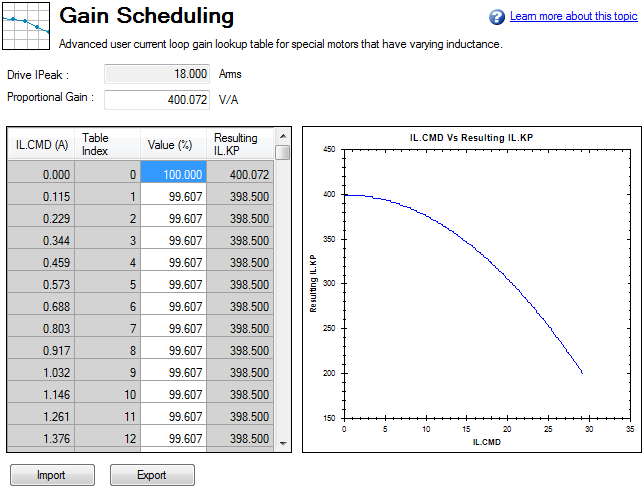
By default, the current loop value will be what is defined in IL.KP across the whole range of currents. To change the value of IL.KP over a range of values, simply enter a scaling term: 0 - 100% of the current value.
Example
If the current loop gain entered on IL.KP was 40.124 (shown above) and a current loop gain of 36 was desired, a scaling term of 90% should be entered for the desired current ranges.
40.124 * 0.90 = 36.112
Using the Terminal View for Gains Scheduling
You can also use the Terminal to set up the Gains Scheduling Table. If you use the Terminal, then two parameters are required for each lookup table point: IL.KPLOOKUPINDEX and IL.KPLOOKUPVALUE. IL.KPLOOKUPINDEX specifies the lookup table index (0 – 255), and IL.KPLOOKUPVALUE specifies the scaling term (0 – 100%) to scale IL.KP.
The current to which a lookup index refers can be calculated as follows:
IL.CMD Range = DRV.IPEAK/157 * IL.KPLOOKUPINDEX
A full list of table values can also be retrieved using IL.KPLOOKUPVALUES, which returns a comma delimited table as follows:
-->IL.KPLOOKUPVALUES
Index Value
0, 100.000
1, 100.000
2, 100.000
3, 100.000
4, 100.000
5, 100.000
6, 100.000
7, 100.000
8, 100.000
9, 100.000
10, 100.000
Rules for Populating Gain Scheduling Table
The gain scheduling table is populated according to the following rules:
- When the drive powers up:
a. If MOTOR.AUTOSET=1 and FB1.MEMVER >= 0.03, the table is read-only. The entries are calculated and set based on the value of MOTOR.LISAT.
b. Otherwise, if table entries have been stored as non-volatile parameters, the values are restored.
c. Otherwise, the table entries are set to default values. - When DRV.RSTVAR
is commanded:
a. Rule 1a is applied.
b. Otherwise, rule 1c is applied. - When MOTOR.AUTOSET is set to 1, rules 1a to 1c are applied in order.
- When the lookup table is imported from a parameter file:
a. Rule 1a is applied (a read-only table cannot be updated).
b. Otherwise, table entries are set to the imported values.
|
Stay Connected with Kollmorgen       
|
Copyright © 2018 Kollmorgen |

|